KnobDeck
Everything, one flick away.
A dial under your cursor, and your phone as a deck, a trackpad, a keyboard, a clicker and a controller. Both know which app you’re in.
Free for 3 days, no account or card. Then $19.99 once, for up to 5 devices.
All platforms
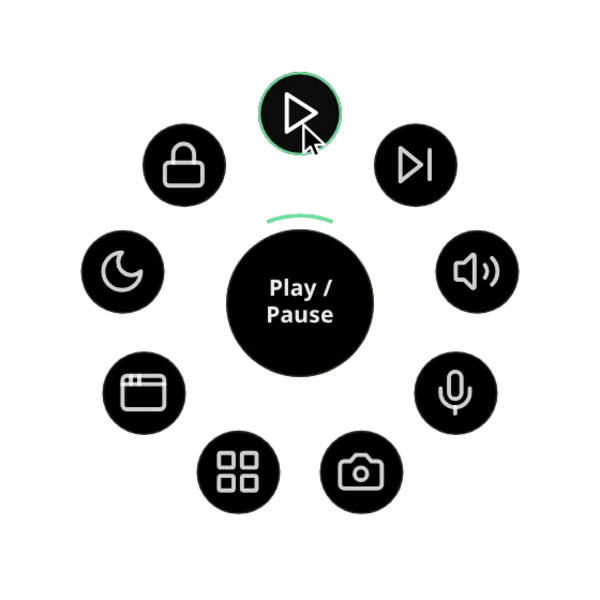
One shortcut opens it, wherever your cursor is.See it work
The dial
Meet everything on it.
Press CtrlAltSpace, a mouse button or a knob, and it opens under your cursor.
Profiles
As many dials as you like.
Give each profile a key of its own. Or press CtrlAltSpace for all of them: it opens the one whose rule fits, and the default when none does.
- EverydayCtrlAltEThe default
- StreamingCtrlAltSWhen OBS is in front
- CodeCtrlAltCWhen the app is Code or Cursor
- MusicCtrlAltMWhen the window title has Spotify
- WindowsCtrlAltWWhen the pointer is in the left half
The remote · Deck
Your deck, on every screen.
Lay it out once in KnobDeck. Your phone and iPad get it, resized tiles and sliders included.
The remote · Deck
Tap it there. It happens here.
Go live, mute, light up, turn the game down. Your computer does it, live.
The remote · Deck
Sliders, not just buttons.
Drag the game down and the music up, each on its own. Any length, upright or sideways.
The remote · Deck
Tiles that keep up.
On Air, Muted, Liked: a tile shows what is true right now. Dynamic actions fill in your scenes, channels and games by themselves.
The remote · Deck
The remote is included.
The KnobDeck phone app puts the deck on any phone or tablet on your Wi-Fi, in the theme you picked on your computer. Nothing more to buy, and you approve each device once.
The remote
The deck is just the start.
The same phone can be a trackpad, a keyboard, a presentation clicker and a game controller, each on its own screen, a flick of a handle apart. Keep scrolling.
A trackpad in your hand.
Glide, tap and scroll with two fingers, like a laptop's trackpad. Switch to Gyro and just point the phone: the cursor follows, and Dial opens your KnobDeck dial right where it is.
The deck first, the rest when you want it.
A new phone gets the deck. Turn on Mouse, Keyboard, Presenter or Gamepad for each phone in KnobDeck's Devices page.
One handle switches modes.
The chevron at the top of the screen, or at the side when the phone is sideways. Tap or drag it, and pick a mode or another PC.
Straight to your PC.
Phone and computer talk directly on your Wi-Fi, encrypted, and only once you've approved the phone.
Make it yours
One theme. Every screen.
Pick a theme on your computer and the dial, the deck and every phone mode take it on. This is the real dial: click the screen to open it, and keep scrolling to see all 14 themes. Themes are HTML and CSS, so anyone can make one.

Plugins
Not shortcuts. Real connections.
Plugins talk to each app the way the app expects, over its own connection or an extension. So a button works while another window has focus, and it shows what's true right now: muted, live, playing.
See every pluginVoice chatMute, deafen, push to talk
StreamingScenes, go live, record
MusicPlay, skip, like
LightsPower, brightness, scenes
CodeRun, debug, any command
Smart homeRooms, scenes, sensors
MeetingsMute, camera, share
GamesYour library on a ring
PresentingNext, previous, blank
AudioPer-app volume, outputs
WeatherNow and today
ClocksTimers and time zones
AI usageYour plan, live
WindowsSnap, move, pin
Native
At home on your desktop.
KnobDeck uses your system's own interfaces, not pretend keystrokes. A shortcut is the last resort, never the plan.
- 01
Windows, the system's way
Tile, snap and move windows between displays through each system's own window interface.
- 02
Audio for each app
Switch outputs and set every app's volume through the system's own mixer.
- 03
Lock and screenshots
The real system calls, not a key combination pressed for you.
- 04
Installs the usual way
From each system's own store or packages, and it keeps itself up to date.
All platforms. Download it on your computer.
Pricing
Pay once. Keep it.
Try it
3 days free
Everything unlocked. No account, no card. It asks for a licence when the time is up, and your profiles stay.
Buy it
$19.99
Once. Up to 5 computers, every plugin and theme, every update. 7-day refund, no questions.
- Up to 5 devices, any mix of desktops
- The dial, the deck and the phone remote
- Every plugin and every theme
- Every update. No subscription
Tax is added at checkout where it applies. Details
One app, where you’d need two.
A radial menu gives you the dial. A button deck gives you the grid. KnobDeck is both, and they share every plugin.
KnobDeckRadial menu appsButton deck apps
A dial that opens under your cursor
A deck of buttons on your desktop
Phone and tablet remoteIncludedOften a paid extra
Talks to apps directlyNot by pressing the app's shortcuts for you.KeystrokesWith plugins
Price$19.99 onceFree to about $40Hardware or a subscription
What apps of each kind say about themselves, November 2026. Individual apps differ.
Questions.
A radial menu, the dial, and a grid of buttons, the deck, for your computer. Press a shortcut, a mouse button or a knob, and the dial opens under your cursor with the actions for the app you're in. Pick one and it's gone.